

Gaming
Jan 23, 2026
Learn whether Battlefield 6 requires Secure Boot on PC, why it matters, how it affects anti-cheat, and how to enable Secure Boot in your BIOS. Photo by: Ars Technica
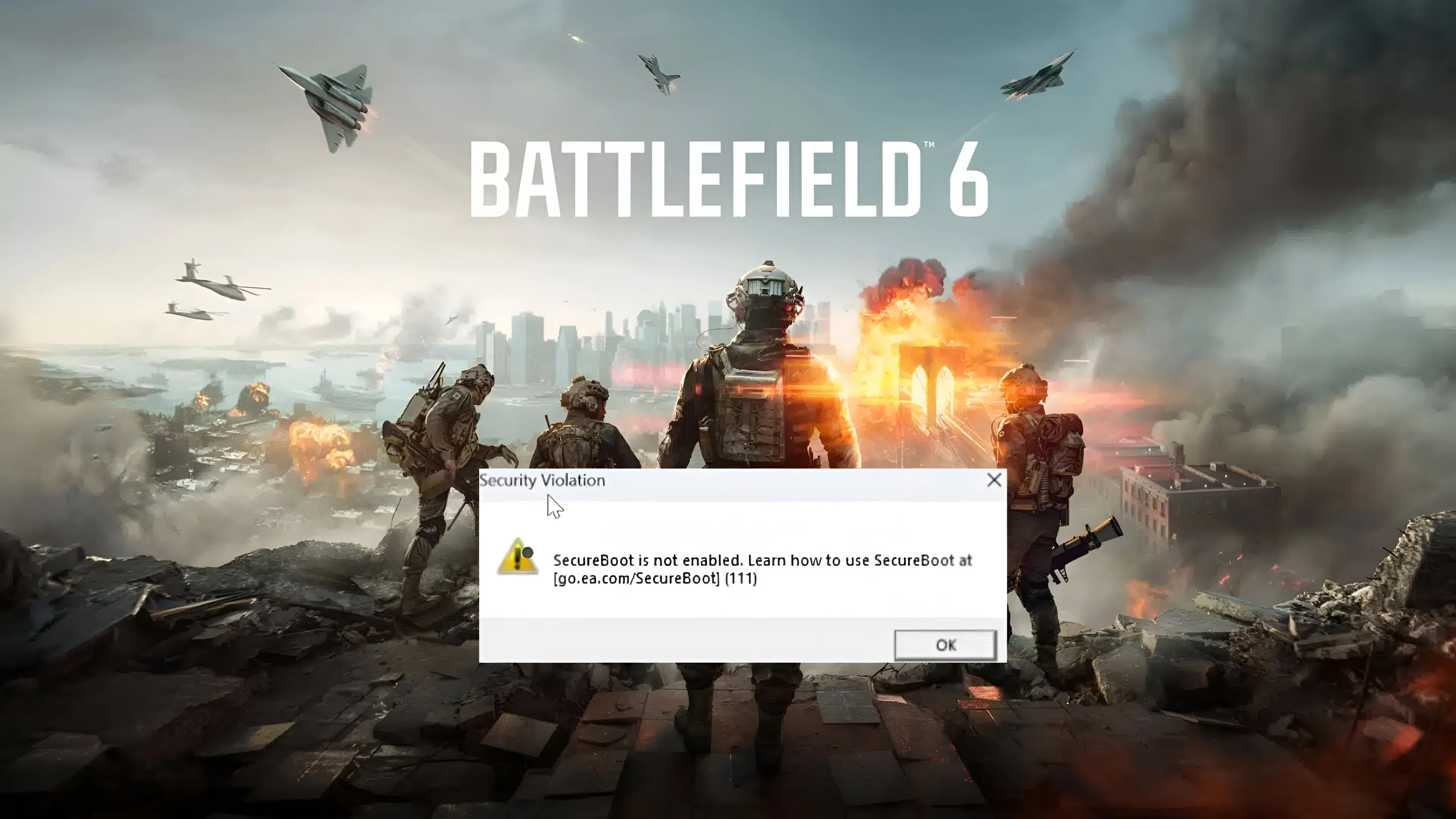
If you're installing Battlefield 6 (or just Battlefield) on your PC, you might see a new requirement pop up when the system checks are run or in the launcher warnings.
You'll need Secure Boot enabled to play Battlefield 6 on your PC.
Secure Boot is a security feature in the firmware of newer computers. For Battlefield 6 onward, EA and DICE are making Secure Boot a requirement for the game as part of their anti-cheat system.
Here's what you need to understand about Secure Boot:
What it is.
Why Battlefield 6 needs it.
How to turn it on if it's off.
What will happen if you don't turn it on.
This guide is easy to read and focuses on getting you real results. No confusing tech stuff here.
Secure Boot is a modern PC feature that makes sure your computer only loads trusted operating systems and drivers when it starts up. It's part of the UEFI firmware.
Simply put:
It stops malware from loading before Windows starts.
It keeps the system secure right down at the firmware level.
It's often needed for today's OS security stuff.
By itself, it's not a type of DRM or a way to restrict games.
Secure Boot isn't part of Windows, but it's a good idea to have it. Often, it's already turned on for you when you get a new computer.

To stop cheating in multiplayer for Battlefield 6, we're using modern anti-cheat tech like Vanguard 2 on some systems and similar kernel-level security.
Here’s why Secure Boot is a must:
It keeps kernel-level anti-cheat drivers safe.
It stops malware from messing with the OS early on.
It cuts down on cheats injecting code before the game and anti-cheat get going.
It fits with current security standards for big competitive games.
Compared to past Battlefield games, anti-cheat in Battlefield 6 is tougher on PC security right from the start, and Secure Boot is an important part of that.
This move helps us at EA and DICE cut down on cheating and unfair play, which have been big headaches in online shooters for a while.
No.
Secure Boot isn't a Windows thing; it's part of your computer's firmware.
You can turn it on if you have:
Windows 10
Windows 11
The OS doesn't really matter as long as your hardware and firmware work with UEFI and Secure Boot.
But, Secure Boot won't work on older computers that use Legacy BIOS.

Press Windows + R
Type msinfo32 and press Enter
In the System Information window look for:
Secure Boot State
If it says On, it is enabled
If it says Off, it needs enabling
Restart your computer.
Go into your firmware settings (usually by pressing Delete, F2, F10, or Esc when the computer starts).
Find the Secure Boot or Security section.
Make sure it's turned on.
The exact location of this setting varies depending on your motherboard, but it's in the UEFI BIOS menus on most newer computers.

If Secure Boot is disabled, here's what you might want to adjust:
Restart your computer.
Go into the BIOS/UEFI settings. The key to get in depends on your computer's maker.
Look for the Boot or Security section.
Switch the Boot Mode from Legacy to UEFI, if it isn't already.
Find Secure Boot and turn it on.
Save your changes and exit.
If you can't find UEFI, Secure Boot might not be supported on your PC.
Also, some machines need CSM (Compatibility Support Module) off.
For older computers, a firmware update might be what you need to see Secure Boot.
This might occur if:
Your Windows was installed in Legacy BIOS mode
Your disk uses Master Boot Record (MBR) instead of GPT
Fix:
You can change your disk from MBR to GPT. Windows lets you do this with a tool called MBR2GPT, and you won't lose any data.
If it's not there:
See if your motherboard works with UEFI.
Update your motherboard's software.
Find the Secure Boot Support settings.
To play Battlefield 6 on PC, you'll need Secure Boot turned on, no matter if you're playing solo or with others. If Secure Boot isn't on, the game probably won't start or you'll see a warning. The anti-cheat system needs it.
Some gamers aren't happy about:
Required firmware features
Anti-cheat tools
What they see as extra steps to start playing
But, Secure Boot does help by:
Keeping the system safe early on
Making some kernel exploits less common
Working with current anti-cheat methods
This give-and-take is becoming normal in online shooters.

Title | Secure Boot Required | Anti-Cheat System |
|---|---|---|
Battlefield 3 | No | Legacy |
Battlefield 4 | No | Legacy |
Battlefield 1 | No | Legacy |
Battlefield V | No | Modern but permissive |
Battlefield 6 | Yes | Modern secure kernel anti-cheat |
Battlefield 6 is taking security seriously, particularly when it comes to keeping competitive matches fair.
Battlefield 6 needs Secure Boot turned on for PCs.
Secure Boot is a function of your computer's UEFI firmware, not the Windows system.
It backs new anti-cheat tech and bumps up overall security.
Your game progress and installs won't be impacted by Secure Boot.
If your computer hardware is able, just switch it on in your BIOS/UEFI settings.
Most gamers can get the game running just by turning on Secure Boot in the BIOS/UEFI. Easy fix!